CodeSpeak in Mixed Projects: Add a Feature to Django Oscar
Let's use CodeSpeak to add a feature to an existing project. We call this mixed mode — only part of the codebase is controlled by CodeSpeak.
In this tutorial, we'll add an order-line report to Django Oscar, the open-source e-commerce framework (⭐︎6.6K on GitHub). The result should look something like this:
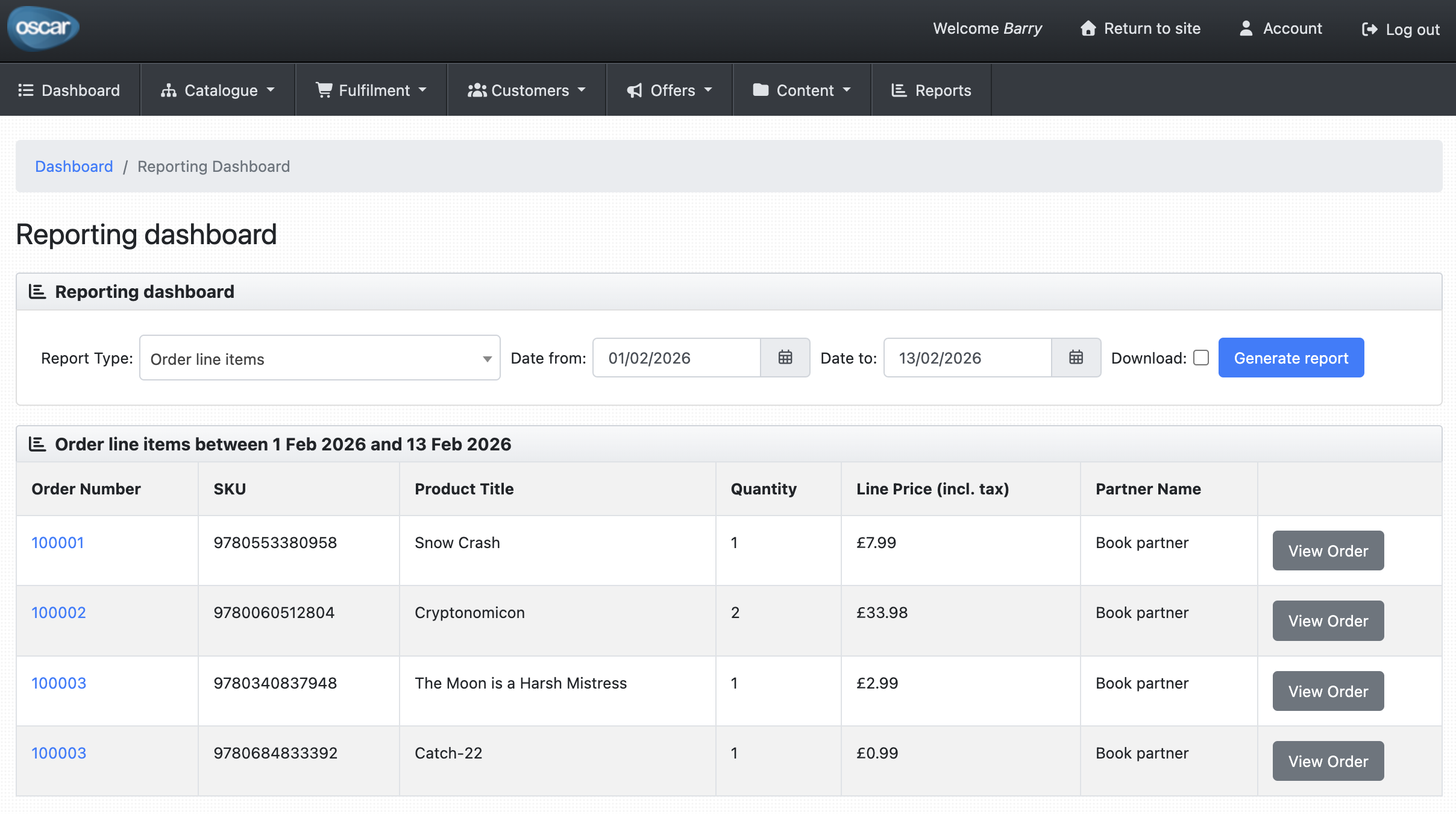
You can examine the final results in this forked repo: codespeak-dev/django-oscar.
Prerequisites
Install uv
CodeSpeak uses uv as its Python package manager.
curl -LsSf https://astral.sh/uv/install.sh | shRestart your terminal (or run source ~/.bashrc / source ~/.zshrc), then verify:
uv --versionGet an Anthropic API key
CodeSpeak is BYOK (Bring Your Own Key). Get an API key at platform.claude.com/settings/keys.
You can provide the key in two ways:
- Paste it when CodeSpeak prompts you (this creates an
.env.localfile in your project directory) - Set the environment variable:
export ANTHROPIC_API_KEY=<your-key>
Install CodeSpeak
uv tool install codespeak-cliVerify the installation:
codespeak --versionLog in
codespeak loginLog in with Google or email/password.
Clone the repo
Let's clone the Django Oscar repo:
git clone git@github.com:django-oscar/django-oscar.git
cd django-oscar
Setup the project
make venvYou can verify the tests pass with
venv/bin/pytest --sqlite=============================== test session starts ===============================
platform linux -- Python 3.14.2, pytest-9.0.2, pluggy-1.6.0
django: version: 5.2.11
rootdir: /home/riazanovskiy/work/django-oscar
configfile: setup.cfg
testpaths: tests/
plugins: django-4.11.1, Faker-40.4.0, xdist-3.8.0, django-webtest-1.9.14
collected 1682 items
tests/functional/basket/test_manipulation.py ... [ 0%]
tests/functional/catalogue/test_catalogue.py .................. [ 1%]
tests/functional/catalogue/test_review.py .... [ 1%]
tests/functional/checkout/test_customer_checkout.py ................ [ 5%]
tests/functional/checkout/test_guest_checkout.py .................. [ 8%]
<...>
1679 passed, 3 skipped in 88.35s (0:01:28)
Now activate the venv, build and start the sandbox site:
source venv/bin/activate
make sandbox
sandbox/manage.py runserver
Visit http://127.0.0.1:8000 to confirm the site loads.
Add an AGENTS.md
Optionally, create an AGENTS.md file to help CodeSpeak's agents navigate the project faster:
# Running Tests

## Setup

```bash
make venv
```

## Run tests

```bash
venv/bin/pytest --sqlite                                          # all tests, SQLite
venv/bin/pytest --sqlite tests/integration/offer/test_availability.py  # single file
venv/bin/pytest --sqlite tests/integration/offer/test_availability.py::TestASuspendedOffer::test_is_unavailable  # single test
```

Without `--sqlite`, tests require a running PostgreSQL server with a database named `oscar` (default config in `tests/settings.py`).
Initialise CodeSpeak
codespeak init
# Initialized CodeSpeak project
This creates a codespeak.json at the repo root. CodeSpeak manages only the files you specify — the rest of the codebase stays untouched.
Create a spec
Create src/oscar/apps/order/line_reports.spec.md:
# Order Line Report

A dashboard report generator for order line items. Each row represents
a single line within an order, covering: order number, SKU, product title,
quantity, line price (incl. tax), and partner name.

Results are filterable by date range on when the order was placed.
Available as both CSV download and HTML table. Restricted to staff users.
CodeSpeak won't touch existing project files by default — it only creates new ones. But our new report generator needs to be registered in Oscar's hardcoded generators list. We explicitly allow this by adding the file to whitelisted_files in codespeak.json:
"whitelisted_files": [
  "src/oscar/apps/dashboard/reports/utils.py"
]
Build
codespeak buildOn the first run, you'll be prompted to log in and add your API key. After that, CodeSpeak will execute the build:
Connecting to build.codespeak.dev:50053...
Remote build started (ID: fa6a6771-3971-4bb1-9441-9d27f9234b3f)

   ██████╗ ██████╗ ██████╗ ███████╗███████╗██████╗ ███████╗ █████╗ ██╗  ██╗
  ██╔════╝██╔═══██╗██╔══██╗██╔════╝██╔════╝██╔══██╗██╔════╝██╔══██╗██║ ██╔╝
  ██║     ██║   ██║██║  ██║█████╗  ███████╗██████╔╝█████╗  ███████║█████╔╝
  ██║     ██║   ██║██║  ██║██╔══╝  ╚════██║██╔═══╝ ██╔══╝  ██╔══██║██╔═██╗
  ╚██████╗╚██████╔╝██████╔╝███████╗███████║██║     ███████╗██║  ██║██║  ██╗
   ╚═════╝ ╚═════╝ ╚═════╝ ╚══════╝╚══════╝╚═╝     ╚══════╝╚═╝  ╚═╝╚═╝  ╚═╝

╭──────────────────────────── CodeSpeak Progress ────────────────────────────╮
│ ✓ Process specification (0.3s)                                             │
│ ✓ Collect project information (0.1s)                                       │
│ ✓ Implement specification (3m 37s)                                         │
│ ╰─ ✓ Collect context & plan work (3m 36s)                                  │
│ ✓ Generate and run tests in mixed mode (11m 33s)                           │
│ ╰─ ✓ Run existing tests to check for failures (1m 0s)                      │
│ ╰─ ✓ Write comprehensive tests for the new functionality (6m 22s)          │
│ ╰─ ✓ ...                                                                   │
│ ╰─ ✓ Fix issues identified in tests (3m 47s)                               │
│ ╰─ ✓ Refactor tests based on feedback to improve conciseness (54.3s)       │
│ ✓ Finalize mixed mode run (0.1s)                                           │
╰────────────────────────────────────────────────────────────────────────────╯
Processing spec 1/1: src/oscar/apps/order/line_reports.spec.md
App built successfully.
Inspect the results
Now you can inspect the newly generated files:
$ git status

Changes not staged for commit:
        modified:   src/oscar/apps/dashboard/reports/utils.py

Untracked files:
        src/oscar/apps/order/.last-known.line_reports.spec.md
        src/oscar/apps/order/line_reports.py
        src/oscar/templates/oscar/dashboard/reports/partials/order_line_report.html
        tests/functional/dashboard/test_line_reports.py
        tests/integration/order/test_line_reports.py
CodeSpeak created line_reports.py, an HTML template, and two test files. It also wired the new report into the whitelisted utils.py.
Run tests
venv/bin/pytest --sqlite=============================== test session starts ===============================
<...>
1702 passed, 3 skipped in 86.52s (0:01:26)
Try it out
Start the sandbox server:
sandbox/manage.py runserverLog in with the sandbox superuser (superuser@example.com / testing) and navigate to http://127.0.0.1:8000/dashboard/reports/ to see the new Order Line Report.
Examine the results
You can browse the complete result of this tutorial at codespeak-dev/django-oscar.
See Also
- CodeSpeak Quick Start: Build a Project From Scratch
Walk through creating a CodeSpeak project from scratch with Python and uv. - CodeSpeak Quick Start: Work in an Existing Project
Walk through adding a feature to an existing code base using CodeSpeak mixed mode.