Smarter handling of tests and a separate `impl` command
By Andrey Breslav
Today we release CodeSpeak 0.3.7. Please find the full release notes at the end of this post.
Automated tests give coding agents feedback before humans do. This is one of the things that makes agents more autonomous and therefore more useful for completing larger coding tasks.
We've all seen agents being "lazy":
- forgetting to run some tests;
- not writing tests for new functionality;
- declaring the job done while tests are still failing...
As CodeSpeak runs agents under the hood, we try to make sure that they are disciplined about tests, and provide some tools you can use for this. In this release, we complete this set of tools with
codespeak buildnow checks if the code generator agent has run all the tests and runs them if it didn't- (if you don't want to make sure tests are run and fixed, use
codespeak implinstead ofbuild);
- (if you don't want to make sure tests are run and fixed, use
codespeak testruns all tests and makes sure that any failed ones are fixed;codespeak test --auto-configurediscovers the commands that run tests in your project- (you can configure these commands manually in
codespeak.json, but our agents seem to be pretty good at doing it for you);
- (you can configure these commands manually in
codespeak coveragecollects coverage data, identifies what tests are missing and adds them.
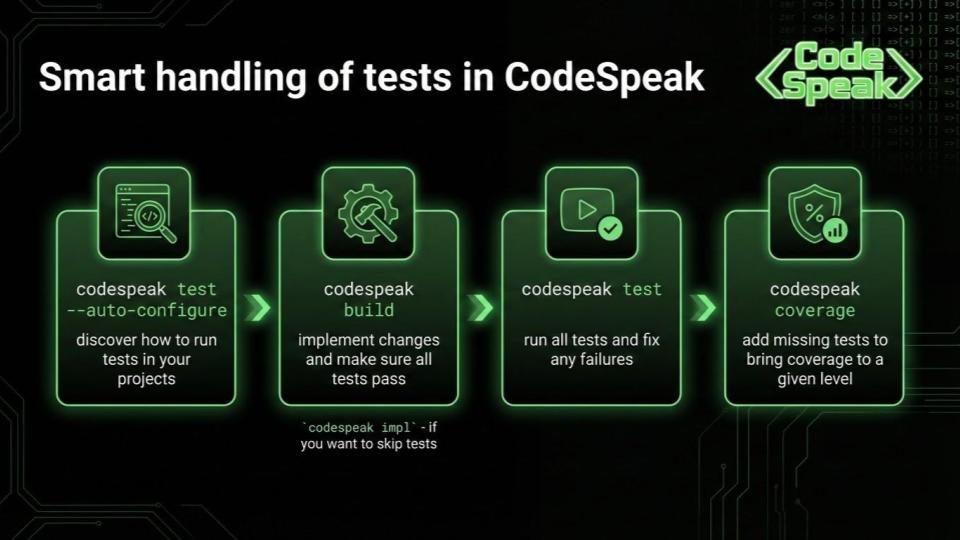
This more granular set of commands gives you more control over your workflow. If you want to iterate in a more quick-and-dirty way, you can run codespeak impl and postpone testing the code more thoroughly. If you want to be sure all tests pass, run codespeak build. If you want to invest into a better test suite, run codespeak coverage which may take a bit longer than the other two.
See the docs for details:
codespeak build— full build with test enforcementcodespeak impl— quick implementation without test enforcementcodespeak test— run and fix testscodespeak coverage— improve test coverage- Improve Test Coverage tutorial — step-by-step walkthrough
We'll be back with more updates soon!
Full Changelog since 0.3.6
New
- Added
codespeak testcommand that auto-detects your test runner (pytest, Jest, Go test, and others) and runs tests with coverage tracking. - Added
codespeak implcommand that tracks which source files remain untested during implementation, available in both mixed and greenfield mode. codespeak buildin mixed mode now allows writing and running tests during the implementation phase, and automatically runs existing tests after the last file edit if a test runner is configured.codespeak takeovernow auto-configures the test runner for your project.- You can now initialize a CodeSpeak project in mixed mode without a git repository.
- The
--no-interactiveflag is now properly supported across all commands. - Added a maximum build spend limit to prevent unexpected costs on long-running builds.
- CodeSpeak now respects the
ANTHROPIC_API_KEYenvironment variable when it's already set, instead of overwriting it from.env.local. - Large directory trees are now trimmed and common non-source directories like
node_modulesare excluded from build context, improving build performance.
Bug fixes
- Improved MCP tool prompts and schema for better integration with Claude Code and other MCP clients.
- Fixed a crash when using third-party providers that don't include cost information in their responses.
- Fixed pydantic
ValidationErrorcrashing MCP tool calls instead of being handled gracefully. - Fixed coverage results not being parsed correctly when the project uses absolute paths.
- Fixed the coverage command not handling the maximum iteration limit correctly.
- Fixed the reason for skipped builds not being displayed.
- Fixed confusing error messages when receiving uncategorized API errors from Anthropic.
You might also like
// releaseMarch 17, 2026 Your intent is everything: Reconstructing specs from vibe coding sessions
New features: Takeover reads vibe coding sessions, Coverage is language-agnostic via LCOV, Anthropic-compatible model providers supported
// releaseMarch 9, 2026 First step in modularity: Spec dependencies and Managed files
New features: Managed files, Spec dependencies/imports
// releaseMarch 2, 2026 CodeSpeak can improve test coverage in your project
New features: Improve test coverage, Takeover without preconfigured specs
// releaseFebruary 23, 2026 First glimpse of
codespeak takeover: Transition from Code to Specs in Real ProjectsNew features: Extract a spec from existing code, improvements to Mixed Mode and error handling