Intent Recovery: The specs you meant to write
By Dmitry Savvinov, Andrey Breslav
After a fruitful vibe coding session, you end up with two things:
- code that does what you want,
- a quickly diminishing memory of all the details you've carefully directed the agent to take care of.
In two days, you'll be working on another feature and two things will happen:
- your agent will forget some of your requirements (because it's an LLM after all),
- you will forget some of your requirements (because you're human after all).
This is where it gets annoying. And the bigger the project becomes, the more it happens. At some point, it starts to slow you down, more and more. What was a breeze a week ago is becoming a bit of a drag, frankly speaking. Requirements drift. A new prompt overwrites last week's careful reasoning. You start being afraid to touch the parts that work. The code doesn't capture why it exists, and all you have at this point is code and your memory.
So, you need to pause and get organised. Vibe coding is great to get from zero to something. To ideate, explore, prototype. Get a feeling of what you are building. It really shines at the very beginning, when the scope isn't clear, and the design space is still fuzzy. When the project is getting a bit more serious, you need something more structured.
With codespeak takeover, you can easily transition from a vibe-coded prototype to a modular set of specs. We call this process Intent Recovery. It will read your specs, inspect the code and git history, map out your architecture and generate a readable spec for each module. Each word in the spec will be grounded in something you said or did when talking to your agent.
This blog post describes improvements we made since the last version of takeover, including what generated specs look like now. Full discussion of this is at the very end. Let's start with a quick walkthrough of the new takeover experience.
Modular takeover with Intent Recovery
The new takeover does a few things:
- inspect your conversation with Claude Code to recover your intent,
- analyze your code and git history to identify the likely module structure,
- let you edit that module structure interactively and split/merge modules as you see fit,
- generate a spec for each module, with every sentence grounded in something you actually said.
Throughout this post, we are using the example of Folio. It's a ~3,000-line dual-pane terminal file manager in Go vibe-coded with Claude Code.
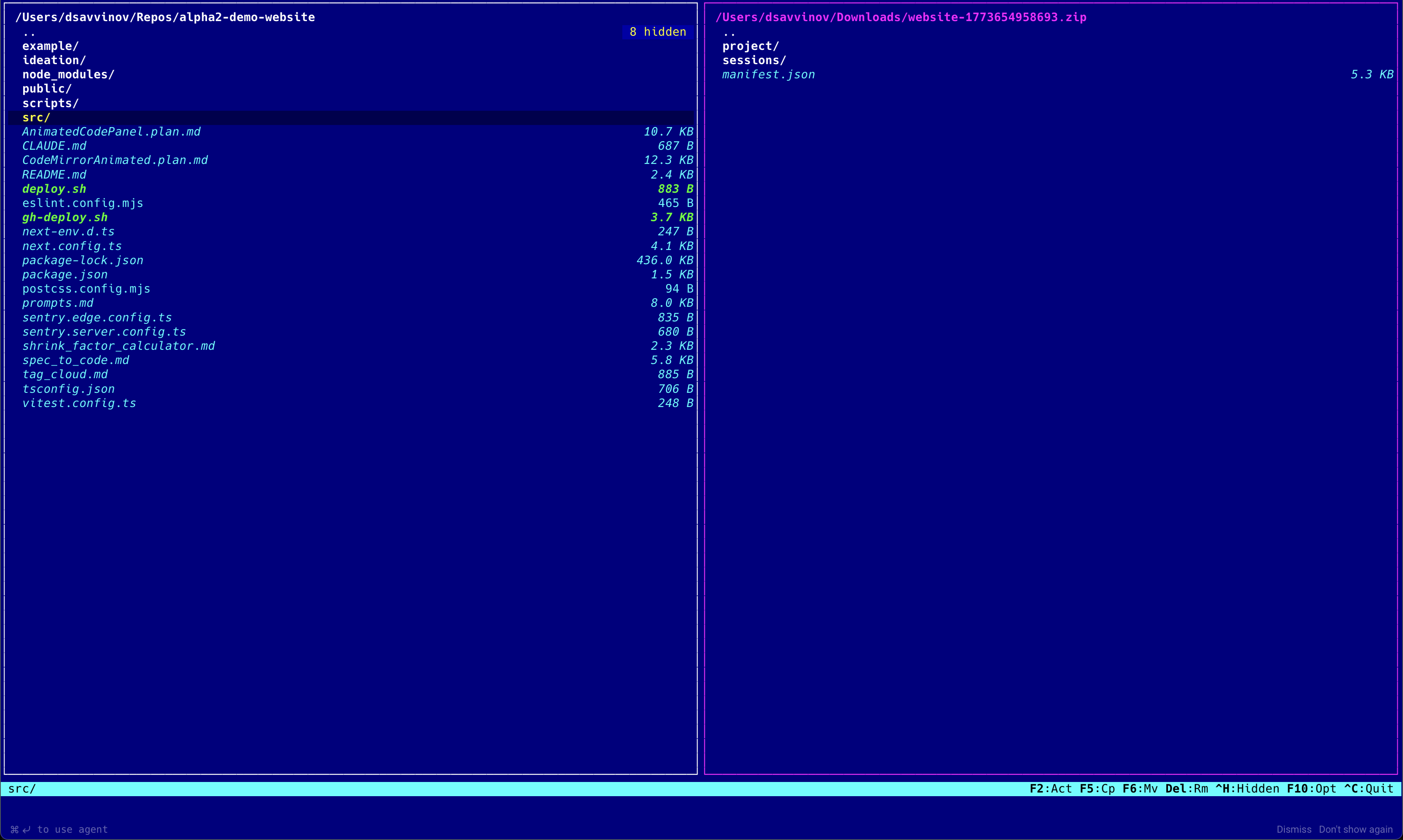
Folio supports browsing files and archives (zip, tar, 7z, rar, and more), copy/move/delete, and even has an integrated terminal emulator. Let's see how takeover can help us recover our intent for this project.
1. Intent Recovery: reading agent sessions
The most important signal about what you meant isn't in the code — it's in the conversation that produced the code. When you told the agent "I need htop to work inside the terminal," the agent wrote a handler and moved on. The code doesn't remember that sentence. Your Claude Code session does.
codespeak takeover reads that session history by default. The first time, it asks permission:
CodeSpeak can read your Claude Code session history to better understand
the intent behind your code. Is this fine?

[Y] Allow  [N] Not now  [D] No, never
Your answer is stored per-project, and you can flip it later. Only Claude Code sessions are supported for now. Support for other agents is on the roadmap.
2. Automatic modularization
One spec for a 3,000-line project is the wrong shape, no matter how well each sentence is written. Modularization is what keeps each individual spec from drifting into the "too verbose" failure mode — good boundaries let per-module specs stay short and focused; bad or missing boundaries force everything into one document nobody wants to edit.
When you run codespeak takeover with no paths, CodeSpeak analyzes the whole project and proposes a modular decomposition through an interactive modularization wizard, hosted in your browser. The initial proposal is deliberately coarse — it reflects the gross structure, not every file boundary:
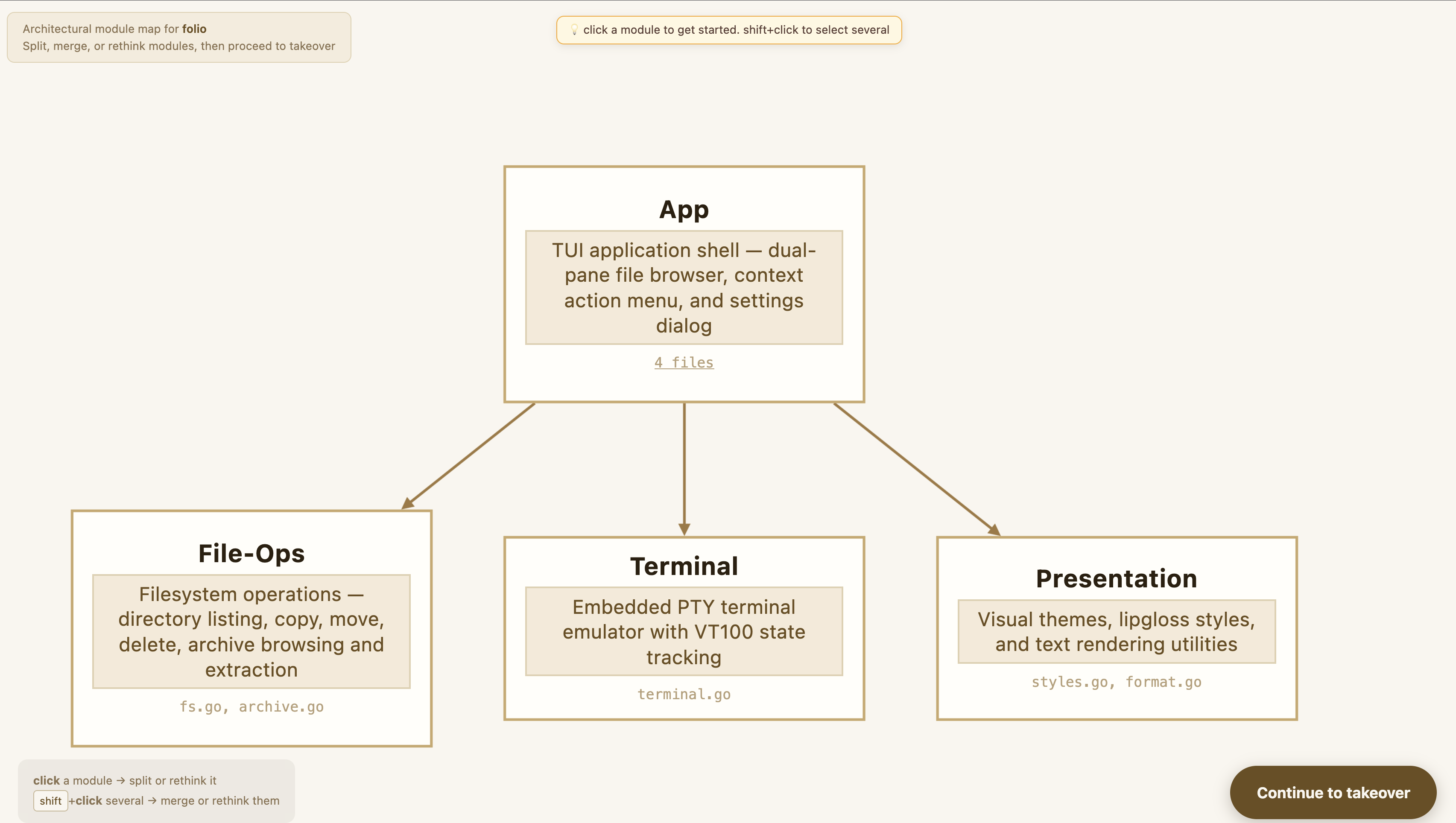
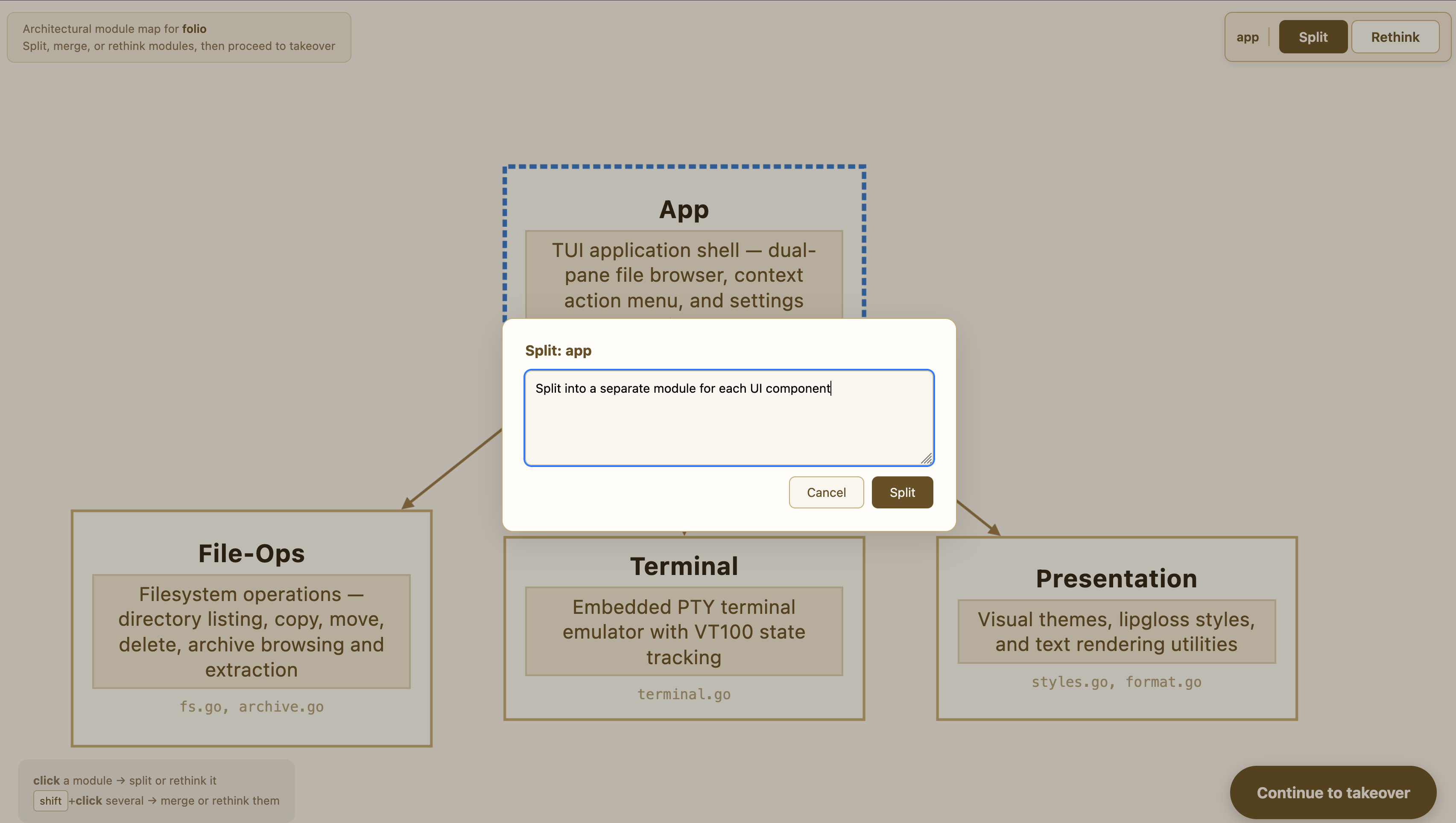
You can inspect each proposed module and refine the structure interactively — ask for finer splits, merge modules that overlap, move responsibilities around:
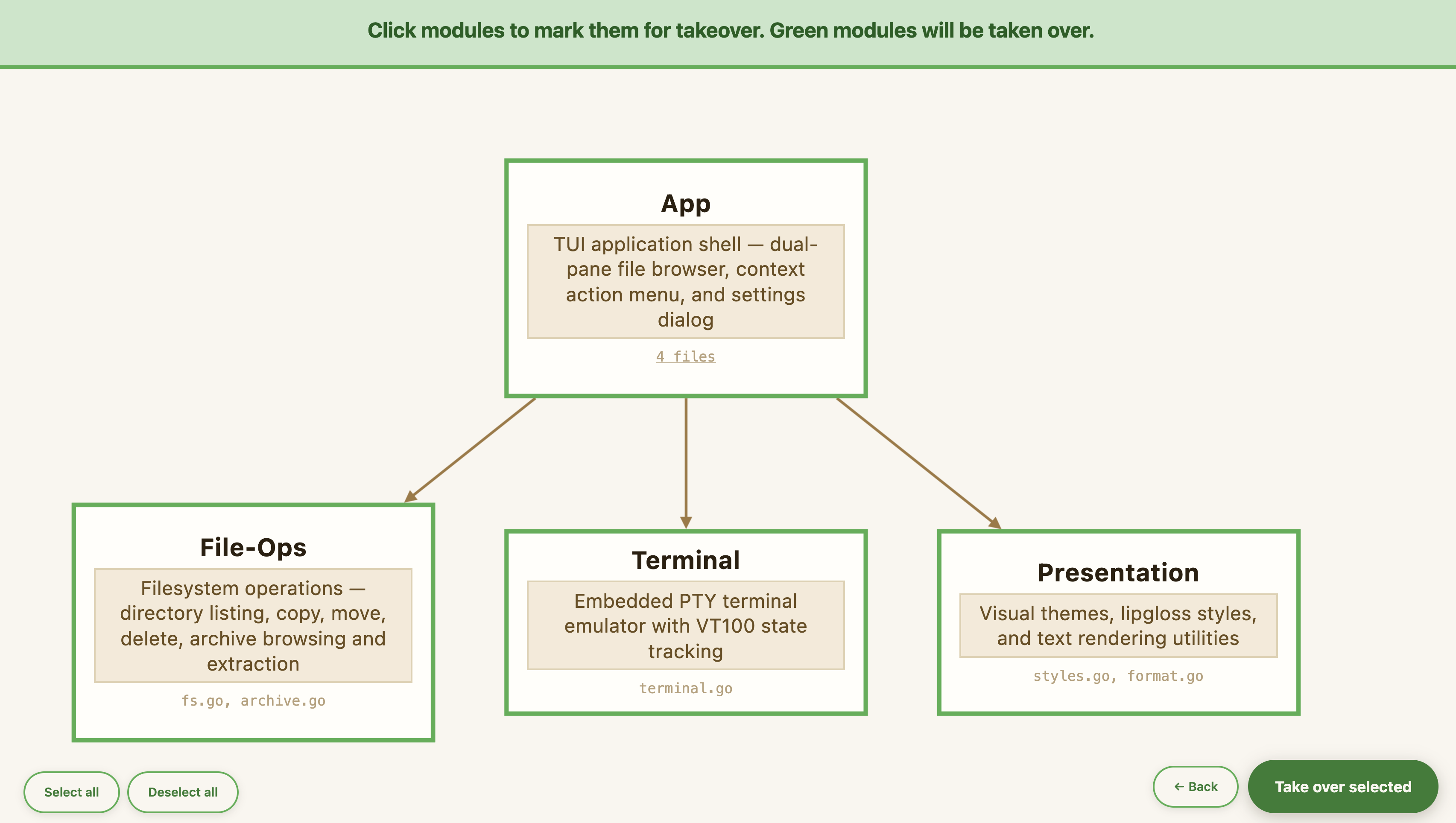
Then pick which modules to hand over. You don't have to take over everything at once — leave some modules as managed code and come back to them later:
Confirming the plan writes one spec per module, wires up import directives between them, and registers them with the project. On Folio, the wizard produced five modules (app, panel, filesystem, terminal, theming) — ~430 lines of Markdown describing ~2,938 lines of Go. The wizard exists because that boundary decision is genuinely a judgment call, and you're the one with the context.
3. Every spec sentence is grounded in an intent piece
Sessions give you the raw material. Modularization sets the boundaries. The last piece is what makes each spec actually worth maintaining inside those boundaries: the spec should reflect what you actually expressed, not what a language model infers from nearby context.
Under the hood, takeover runs a three-phase pipeline. First it distills your sessions into a structured intent artifact — functional and non-functional requirements, user stories, alternatives you tried, things you explicitly decided not to do, UI preferences, test expectations. It's an internal intermediate, not something you're meant to edit, but conceptually it's where a prompt like "I want htop to work inside the terminal" turns into a concrete requirement the spec generator can use.
Then it generates the spec against that intent, with access to the code.
Then — this is the new part — it audits every sentence of the draft. Each sentence is labeled one of three ways:
- linked — traces back to a specific intent item you expressed
- util — structural boilerplate like headings, link glue, obvious code-derived signatures
- unanchored — substantive claims with no backing in your sessions or the code
Unanchored sentences are removed. Missing intent items — things you said but the draft didn't pick up — are added. Only after that audit passes is the spec written to disk.
What a recovered spec looks like
Let's zoom in on terminal.go — the embedded PTY-backed terminal that makes htop, vim, and claude work inside the app.
Here's what the old takeover (no sessions, no grounding) produced on that file:
# Terminal Panel

The terminal panel is an embedded PTY-backed terminal emulator displayed below the file panels. It is toggled via `Ctrl+T`, auto-focuses when opened, and is resizable by the user.

## Data Model

`TerminalModel` holds:
- `ptyFile` — the PTY file descriptor (master side)
- `cmd` — the shell process
- `vt` — a `vt.SafeEmulator` that maintains the screen state
- `width`, `height` — current dimensions in columns/rows
- `focused`, `closed` — focus and lifecycle state
- `appCursorKeys` — tracks DECCKM mode (arrows send `\x1bOA` vs `\x1b[A`)
- `appKeypad` — tracks DECNKM mode

The `Model` struct holds:
- `Terminal *TerminalModel` — nil until first `Ctrl+T`
- `TermVisible bool`
- `TermHeight int` — rows allocated for terminal content (border rows excluded)

## Lifecycle

### Creation (`NewTerminal`)

1. Reads `$SHELL`; falls back to `/bin/sh`.
2. Starts the shell process in `workDir` via `pty.StartWithSize`, with `TERM=xterm-256color` appended to the environment and the PTY sized to `(width, height)`.
3. If PTY creation fails, returns a `TerminalModel` with `closed=true` and no command.
4. Creates a `vt.SafeEmulator(width, height)` and registers `EnableMode`/`DisableMode` callbacks to keep `appCursorKeys` and `appKeypad` in sync.
5. Launches a background goroutine that continuously reads from the emulator's internal response pipe (`emu.Read`) and writes responses back to the PTY. This is required because applications that issue terminal queries (DA1, DA2, etc.) expect replies; without draining the pipe, `emu.Write()` would block and freeze the event loop.
6. Returns the model and a `readPTY` command to begin draining PTY output.

### PTY output loop (`readPTY`)

A single-shot `tea.Cmd` that reads up to 4096 bytes from the PTY file. Returns `TermOutputMsg(data)` on success or `TermClosedMsg{Err}` on error. The main update loop re-issues `readPTY` after each `TermOutputMsg` to continue draining.

### Message handling in `Model.Update`

- `TermOutputMsg`: writes the bytes into the emulator (`vt.Write`) and re-queues `readPTY`.
- `TermClosedMsg`: marks `Terminal.closed = true`, `Terminal.focused = false`, sets status message to `"Terminal exited"`.

### Resize (`Resize`)

Updates internal `width`/`height`, calls `vt.Resize`, and notifies the PTY via `pty.Setsize`. Skips if either dimension is < 1.

### Close (`Close`)

Closes the emulator (unblocking the drain goroutine), kills and waits on the process, closes the PTY file, sets `closed = true`.

## Toggle and Focus (`handleTerminalToggle`)

Behavior depends on current state:
- **No terminal or closed terminal**: spawn a new one. Initial height is `max(5, windowHeight/3)` if `TermHeight` is 0; width is `windowWidth - 2`. Sets `TermVisible = true`, `focused = true`.
- **Visible terminal**: hide it (`TermVisible = false`, `focused = false`).
- **Existing hidden terminal**: show and focus it.

When opened, the terminal's working directory is the active panel's current path.

## Key Routing

When the terminal is focused and not closed, `Model.Update` intercepts only the following keys at the application level:

| Key | Action |
|---|---|
| `Ctrl+T` | Toggle (hide) terminal |
| `Ctrl+\` | Kill terminal |
| `Ctrl+R` | Sync directory |
| `Ctrl+Up` | Grow terminal by 2 rows |
| `Ctrl+Down` | Shrink terminal by 2 rows |

All other keys are forwarded to the PTY via `Terminal.WriteKey(msg)`, which converts them to bytes and writes directly to `ptyFile`.

When the terminal is not focused, `Ctrl+T` still toggles it, and `Ctrl+Up`/`Ctrl+Down` resize it if visible.

## Key-to-Bytes Translation (`keyToBytes`)

Converts a `tea.KeyMsg` to raw terminal escape sequences. Alt modifier prepends `\x1b`.

| Key(s) | Bytes |
|---|---|
| Printable rune | UTF-8 bytes |
| Enter | `\r` |
| Backspace | `\x7f` |
| Tab | `\t` |
| Space | ` ` |
| Escape | `\x1b` |
| Up/Down/Right/Left | Mode-aware (see below) |
| Home | `\x1bOH` (DECCKM on) / `\x1b[H` (off) |
| End | `\x1bOF` (DECCKM on) / `\x1b[F` (off) |
| Delete | `\x1b[3~` |
| PgUp | `\x1b[5~` |
| PgDown | `\x1b[6~` |
| Insert | `\x1b[2~` |
| Ctrl+Up/Down/Right/Left | `\x1b[1;5A/B/C/D` |
| Shift+Up/Down/Right/Left | `\x1b[1;2A/B/C/D` |
| Ctrl+Shift+Up/Down/Right/Left | `\x1b[1;6A/B/C/D` |
| Shift+Tab | `\x1b[Z` |
| F1–F4 | `\x1bOP`, `\x1bOQ`, `\x1bOR`, `\x1bOS` |
| F5 | `\x1b[15~` |
| F6–F12 | `\x1b[17~`–`\x1b[24~` (F6=17, F7=18, F8=19, F9=20, F10=21, F11=23, F12=24) |
| Ctrl+A–Z (excl. I, J, M) | `0x01`–`0x1a` respectively |
| Ctrl+\ | `0x1c` |
| Unrecognized | nil (nothing written) |

**Arrow key mode (`arrowSeq`)**: In application cursor mode (DECCKM active): `\x1bO[ABCD]`; otherwise `\x1b[[ABCD]`.

## Sync Directory (`handleTerminalSyncDir`)

Writes `cd "<path>"\n` directly to the PTY. If the active panel is inside an archive, the path is the archive file's parent directory. Sets a status message confirming the sync.

## Kill Terminal (`handleTerminalKill`)

Calls `Terminal.Close()`, sets `TermVisible = false`, updates panel sizes, sets status message `"Terminal killed"`.

## Resize (`handleTerminalResize`)

Adjusts `TermHeight` by the given delta. Clamped to `[5, windowHeight - 10]`. Calls `updatePanelSizes()`, which propagates the new dimensions to both the emulator and PTY.

## Layout Integration

When `TermVisible`, the terminal panel renders between the file panels and the status bar. It occupies `TermHeight + 3` total rows (content + border top/bottom + title). File panel height is reduced accordingly.

The terminal border uses `theme.TermActiveBorder` when focused, `theme.TermInactiveBorder` otherwise. When closed, the content area shows `"[ Shell exited. Press Ctrl+T to restart. ]"` instead of the emulator render.

## Status Bar (terminal focused)

When the terminal has focus, the status bar right side shows: `^T:Hide  ^R:Sync dir  ^\ :Kill  ^↑:Grow  ^↓:Shrink`.
126 lines. Accurate. And largely useless.
Three things are wrong with it, and they're the same three things that go wrong with most file-to-spec takeover tools:
It leaks across module boundaries. The Model struct is the top-level application state. It's described here because terminal.go touches a couple of its fields, but it isn't about the terminal — it's about the app. The Status Bar section and the Layout Integration section are presentation concerns. If you ever want to edit the terminal spec to change terminal behavior, you're editing things that belong to three other modules.
It transcribes implementation detail the reader will never hand-edit. The Key-to-Bytes Translation table has twenty-seven rows of escape sequences — \x1b[3~ for Delete, \x1b[1;6A/B/C/D for Ctrl+Shift arrows. It's faithful to the code. Nobody is ever going to change the spec because they wanted Ctrl+Shift+Left to send a different escape. That information belongs in code; reproducing it in the spec just adds a second place to maintain it.
It describes mechanics without motivation. The "Key Routing" section tells you which keys are intercepted at the application level — fine, you can derive that from the code. What it doesn't tell you is why only those keys. The actual design decision lives one level up: everything else had to fall through because the author wanted htop, vim, and claude to run inside the terminal unmodified. Without that framing, the next edit breaks htop and nobody catches it until someone tries.
The pattern underneath all three: the old spec is a careful transcript of the code. And a careful transcript isn't what you want. If you wanted to read code, you'd read the code.
And here's what ships today:
# Terminal Panel

The terminal panel is an embedded shell session shown at the bottom of the file manager UI.

## Visibility & Focus

- Toggled via **Ctrl+T**: opens if hidden, hides if visible
- When opened, the terminal auto-focuses and its working directory is set to the active file panel's current directory
- **Ctrl+R** (while terminal is focused) syncs the terminal's working directory to the active panel's current folder
- **Ctrl+\\** kills the terminal session (escape hatch)
- **Ctrl+Up** / **Ctrl+Down** resize the terminal panel (increase / decrease height)
- The status bar shows terminal-specific shortcuts when the terminal is focused

## Key Routing

When the terminal is focused, **only** the following keys are handled by Folio itself; all other keypresses are delivered directly to the terminal application:
- Ctrl+T (toggle terminal visibility)
- Ctrl+\\ (kill terminal session)
- Ctrl+Up / Ctrl+Down (resize terminal panel)

This ensures interactive TUI apps running inside the terminal (e.g., htop, vim, claude) receive all keypresses they need.
Twenty-one lines. Six times shorter. And worth reading.
Two things are interesting about what's in this spec:
-
The Key Routing section closes with the actual design rationale: "This ensures interactive TUI apps running inside the terminal (e.g., htop, vim, claude) receive all keypresses they need." That sentence wasn't derived from the code — it came from a prompt in the author's Claude Code session, during an early exchange about why the terminal swallows so much. It's the reason the passthrough exists.
-
Every other bullet is user-facing behavior: what
Ctrl+Tdoes, whatCtrl+Rdoes, where the panel appears on screen. These are things the author asked for explicitly while building Folio.
But the more interesting claims are about what's not in this spec:
- There is no Key-to-Bytes Translation table. No
\x1bOPfor F1. The code still does all of that; the spec doesn't describe it, because the author never discussed it. - There is no mention of DECCKM or
appCursorKeys. These modes exist in the code — arrow keys really do need to send different escape sequences depending on whether the running app enabled application cursor mode. But the author never prompted for DECCKM support. It showed up in generated code as a side effect of "make the terminal work with vim." So it's not in the spec. - There is no
TerminalModelstruct walkthrough. NoptyFile, novt.SafeEmulator. Those are implementation artifacts.
That omission is the point. The spec reflects what the author said — not what the code incidentally does. The DECCKM support will keep working whether the spec talks about it or not, because the code that implements it is still there. But a future edit to the spec isn't going to accidentally break it, because nothing in the spec claims authority over DECCKM.
With the two specs side by side, the quality bar is easier to state: a takeover spec should read like the thing you'd write if a colleague asked you to explain this part of the project — cleaned up, organized, persistent. Close to what you expressed to the agent, not close to the code the agent produced. Intent-near, not implementation-near.
The concrete test: for every sentence in the spec, you should be able to point to a moment during the build where you, the human, said that sentence in a prompt. If you can't, it probably doesn't belong. That test is what the new takeover enforces.
Try it
If you have a vibe-coded project sitting in a state of "I'm afraid to touch it" — this is what takeover is for.
Install CodeSpeak (instructions), change into your project directory, and run:
codespeak takeoverThe full walkthrough with commentary lives in the takeover tutorial.
We'd love to hear how it goes — especially the parts where it didn't work. Join us on Discord and tell us what your vibe-coded project looks like, what the wizard proposed, whether the specs it produced felt close to the thing you'd have written yourself. That feedback is what pushes the proposal quality forward.
Folio itself is on GitHub — the takeover-modular-and-improved-intent branch has the five specs and the takeover state from the run whose terminal.cs.md you saw above.
Updates are coming soon!
You might also like
// featureApril 8, 2026 Modular takeover: from vibe-coded app to spec-driven development
Preview: a new modular takeover mode that analyzes your vibe-coded app, proposes a module structure through an interactive web wizard, and takes over one module at a time